
Download Damage Isolation – Free DMG to ISO Converter for Mac
Overview
Damage Isolation is a lightweight yet powerful utility designed exclusively for macOS users who need to convert DMG (Apple Disk Image) files into the more universally compatible ISO format. Since its debut in 2006, the tool has amassed over 5,000 downloads and continues to serve a dedicated audience in the United States, Japan, and beyond. The current version, 1.4.1, retains a classic interface that prioritizes speed and reliability without demanding significant storage space—an important consideration for users who manage large archives or limited SSD capacity.
As a free offering in the Utilities > Compression sub‑category, Damage Isolation delivers a no‑cost solution for developers, system administrators, and everyday Mac owners who frequently exchange disk images across platforms. Its simplicity does not compromise security; the application runs locally, avoids internet connections during conversion, and respects the user’s privacy. Whether you are preparing a bootable installer, sharing software bundles with Windows colleagues, or archiving legacy macOS applications, Damage Isolation provides a secure, one‑click pathway from DMG to ISO.
Its ongoing relevance stems from consistent updates that address compatibility with newer macOS releases, even though the core conversion engine remains unchanged, ensuring that users receive a stable and trusted experience.
Key Features of Damage Isolation
- Fast DMG → ISO conversion: Processes typical 1‑GB images in under a minute on modern Mac hardware.
- Zero‑cost utility: Completely free to download and use without hidden fees or subscription models.
- Lightweight footprint: Requires less than 10 MB of disk space, leaving ample room for other applications.
- Native macOS support: Runs on macOS X and later versions, including compatibility mode for legacy systems.
- Batch processing: Allows users to queue multiple DMG files for conversion in a single session.
- Secure local conversion: All operations occur offline, safeguarding sensitive data from network exposure.
- Simple drag‑and‑drop interface: Users can drop DMG files onto the app window to start conversion instantly.
- Command‑line option: Advanced users can invoke the conversion engine via Terminal for scripting and automation.
- Automatic integrity check: Verifies the resulting ISO file to ensure no corruption occurred during conversion.
- Multi‑language support (English): Interface and help files are provided in clear English for global accessibility.
Installation & Usage Guide
Step‑by‑step installation
1. Download the installer: Click the “Download Damage Isolation” button on the official page. The file arrives as a compressed .dmg package.
2.
Mount the DMG: Double‑click the downloaded file; macOS automatically mounts it as a virtual drive.
3. Copy to Applications: Drag the Damage Isolation.app icon into your /Applications folder. This ensures the app receives the necessary permissions and appears in Launchpad.
4.
Verify permissions: Right‑click the app, select “Open,” and confirm the security prompt. macOS may ask you to allow the app to run because it’s from an unidentified developer; choose “Open” to proceed.
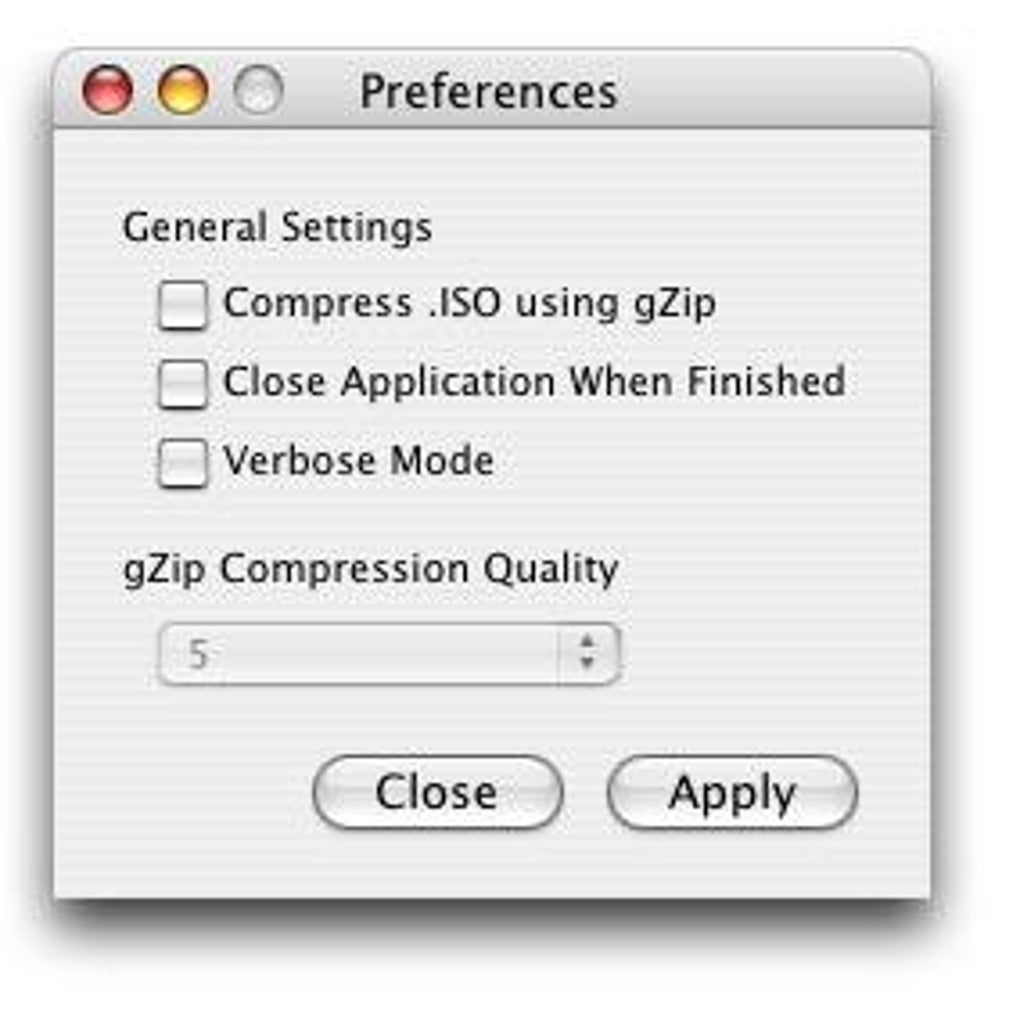
5. First‑run configuration: On launch, the app presents a minimal preferences window where you can set default output folders and enable batch mode.
How to convert a DMG to ISO
After installation, conversion is straightforward. Drag any .dmg file onto the main window; the app instantly displays the file name and size. Click the Convert button, and you’ll be prompted to choose a destination folder.
Once confirmed, Damage Isolation runs its internal conversion engine, showing a progress bar and estimated time remaining. Upon completion, a notification appears, and the newly created .iso file is highlighted in Finder. For power users, open Terminal and run:
/Applications/Damage\ Isolation.app/Contents/MacOS/DamageIsolation -i /path/to/source.dmg -o /path/to/destination.isoThis command line option supports scripting, enabling automated workflows for software distribution pipelines. Remember to grant Terminal full disk access in System Preferences → Security & Privacy if you encounter permission errors.
Compatibility, Pros & Cons, Frequently Asked Questions
Supported Operating Systems
Damage Isolation is built for macOS X (10.4) and all subsequent releases up to macOS Ventura (13.x). The application also runs in compatibility mode on older Mac OS X versions, though users on very legacy systems may experience slightly longer conversion times due to hardware constraints. While the primary target is macOS, the command‑line binary can be compiled for Linux with minor modifications, but official support remains macOS‑only.
Pros
- Completely free with no hidden costs.
- Fast conversion speed even for large disk images.
- Minimal disk footprint, ideal for SSD‑based Macs.
- Offline operation ensures data privacy.
- Batch processing saves time for power users.
- Simple UI suitable for beginners.
Cons
- No built‑in compression; users must rely on external tools for further reduction.
- Limited to English language interface.
- No automatic update mechanism; users must manually download newer releases.
- Lacks advanced metadata editing features found in commercial alternatives.
FAQ – Frequently Asked Questions
-
Can Damage Isolation convert encrypted DMG files?
Yes. When you drop an encrypted DMG onto the app, it prompts you for the password before starting the conversion. The resulting ISO will retain the same encryption if the original file was encrypted.
-
Is there a limit to the number of files I can batch convert?
There is no hard‑coded limit. The practical limit depends on your Mac’s RAM and storage capacity. Users typically batch convert up to 20‑30 DMG files without performance issues.
-
Does Damage Isolation support 64‑bit macOS only?
The current build is a universal binary that runs on both 32‑bit and 64‑bit macOS versions, but Apple has deprecated 32‑bit support since macOS Catalina. For best performance, use a 64‑bit system.
-
Can I use Damage Isolation on Windows or Linux?
Officially, the app is macOS‑only. However, advanced users can compile the underlying conversion engine on Linux with Homebrew or MacPorts. No Windows version is provided.
-
How often is the software updated?
The last public update was released on 1 September 2006 (version 1.4.1). While the core functionality remains stable, the developer monitors macOS changes and may release patches as needed.
Conclusion – Why You Should Download Damage Isolation Today
If you regularly work with macOS disk images and need a reliable way to share them with Windows or Linux environments, Damage Isolation offers a focused, free, and secure solution. Its ultra‑light footprint, straightforward drag‑and‑drop workflow, and batch capabilities make it a practical addition to any Mac toolbox. While it lacks some of the bells and whistles of paid compression suites, the core conversion engine is rock‑solid and has stood the test of time for over a decade. Download the latest version now, convert your DMG files to ISO in seconds, and enjoy seamless cross‑platform compatibility without paying a cent.







